
Types of Computer Software: System Software and Application Software
Introduction
A computer system consists of both hardware and software. Remember that hardware alone cannot make a computer work properly. Tangible parts such as keyboard, monitor, and CPU are essential, but they cannot perform any meaningful task on their own. Something else is also required to guide those parts and instruct them what to do. That “something” is software.
In other words, software is the intelligence of a computer, and it makes a computer functional. In the absence of software, a computer system will simply be a machine with physical components but no direction. It will not be able to perform tasks such as opening files or carrying out meaningful activities.
Almost every new user gets confused about different types of software. A few of them think that all software is the same. Others mix up system software and application software without understanding their differences.
The main purpose of this article is to explain the two main types of computer software in simple and understandable language. By the end of this article, you will clearly understand what software is and how its types work together within a computer system.
What Is Computer Software?
Let us begin with an explanation of software.
Computer software is a set of instructions and programs that instruct a computer on how to perform tasks. These instructions guide the computer in a systematic way so that it can complete different operations.
Without software guidance, a computer would not know how to respond when you press a key or click a mouse. It controls the behavior of the system and makes it active.
Simple Definition of Software
As we learned before, software is a set of programs and instructions that guides the computer system. It is non-tangible, which means it does not have any shape like hardware. Users cannot touch it or hold it in their hands.
Although it does not have any visible appearance, it is always working in the background. It controls how the system starts, how programs initiate, and how tasks are completed.
Why Software Is Important?
Software is the one that makes hardware useful. Even if a computer has all the necessary physical parts or components, it cannot function without software.
When you write a document, browse a website, or watch a video, software is the one that allows these activities to happen. It provides instructions and ensures the behavior of the system. In short, software provides purpose to the computer.
Main Types of Computer Software
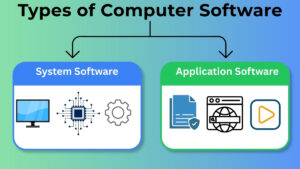
There are many forms of software in the world of computers. However, for beginners, only two main types are important:
- System Software
- Application Software
These two categories of software form the basic structure of all computer programs. They support each other and work together to ensure the smooth operation of computers.
System Software
When a computer system is turned on, system software also starts running in the background. It is a type of software that controls the entire computer system.
Users usually do not interact with the system software directly while performing normal tasks. Yet, it plays a very important role in managing the system.
Application Software
Unlike system software, users directly interact with application software. It is designed to help users in performing specific tasks.
For example, whenever you open a program to perform a certain task, you are using application software. Its main focus is to help users achieve particular goals.
System Software Explained
The responsibility of system software is to manage overall functioning of the computer. It makes sure that different parts of the system work together properly.
It manages the basic system activities and keeps the system organized. System software is always active in the background even when it is not noticed.
Role of System Software
The major role of system software is to act as a bridge between computer’s internal operations and the user.
Whenever a user gives any command, system software processes that command and makes sure the system responds correctly to it. It also manages stability and helps other programs to run smoothly.
Examples of System Software
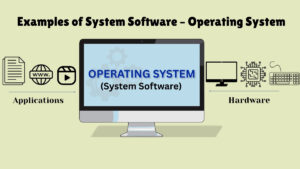
A very common example of system software is the operating system. It is present in every computer device.
The operating system controls basic working of the computer. It maintains system operations and allows application software to function correctly.
Application Software Explained
Application software is designed for users to perform specific tasks. It is a type of software that common people use in daily life, to complete their computer-related activities.
Unlike system software, application software is opened and used directly by the user. It mainly focuses on practical functioning rather than system controlled tasks.
Role of Application Software
As you saw earlier, the main role of application software is to help users finish their daily activities such as:
- Writing a document
- Browsing the internet
- Watching videos
- Listening to music
- Studying
It is task-oriented. Every program here is designed to perform a particular function supporting the user needs.
Examples of Application Software
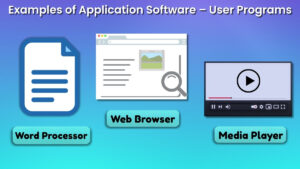
A few common examples of application software are:
- Word processor
- Media player
- Web browser
These programs are directly used by people to perform particular tasks. They are used to make computers helpful for work, education, and entertainment.
Difference Between System Software and Application Software
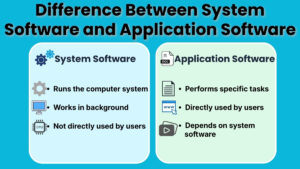
In order to build clarity and avoid confusion as a beginner, you need to understand the differences between these two types of software.
Purpose Difference
On one hand, system software is responsible for running and controlling the computer system properly.
On the other hand, application software is designed to help users in performing specific tasks.
User Interaction
In system software, users usually do not interact with it directly while performing daily tasks. It works mostly in the background.
In application software, users interact with it directly. People open it, use it, and close it after completion of their work.
Dependency
Application software is dependent on system software to function. It cannot run without system software.
Though system software is not dependent on application software. It can still operate in the same way, even if certain applications are not installed in the system.
Real Life Example to Understand Software Types
Let us observe a simple real life example in order to make this concept easier to understand.
Example: Let’s consider an example of a smartphone or a computer system.
System software is the operating system of this device. Overall functioning of the device is managed by it, and it also controls the basic working of the system.
Application software includes the apps that you use for messaging, browsing, or watching videos. These apps allow you to perform specific activities or tasks.
This example clearly shows how both types work together as a whole. The system software manages the device, while application software allows you to complete different tasks.
Common Confusions about Software that Beginners come Across
Many beginners often think that all software is the same. They might refer to every program as an app without understanding the difference.
Another usual confusion is neglecting system software. As we know, system software works in the background, and because of this reason many users do not realize how important it is. No application would function without it.
Getting clarity on the difference between both types will help beginners remove such confusion and make computer learning easier.
Why Learning Software Types Is Important?
Learning about system software and application software will build a strong foundation in computer fundamentals for learners.
When you understand the difference, you can:
- Use a computer in your daily life more confidently.
- Have concept clarity on how programs depend on the system.
- Recognize which type of issue is related to system or application.
- This might be basic knowledge, but it makes advanced computer topics easier to understand in the future. Almost every higher-level concept is interrelated to these two software types.
Conclusion
In conclusion, let us briefly review each type. Computer software is important for making computer functional and useful. It provides a set of instructions that guide the entire system.
The two main types of computer software are: system software and application software. One controls and manages the computer, while the other helps the user to perform specific tasks.
Both types have their own importance. When you clearly understand these differences, you will be able to develop a strong and confident foundation in computer fundamentals.