
How Does a Computer Work? Step-by-Step Explanation for Beginners
Introduction
Many users, especially beginners, often wonder how a computer actually works. When we press a key on the keyboard, click the mouse, or open a file, the result appears almost instantly on the screen. These processes look very simple from outside, but inside the system, the computer follows a clear and organized set of steps every time.
However, a computer cannot think, feel, or make any decisions on its own. It only works according to the instructions provided by the user. Every function, no matter how small, follows a strict working pattern.
The main purpose of this article is to explain how a computer works in a simple, step-by-step manner. This explanation is designed especially for beginners, without using any technical terms, internal hardware details, or complex theory. Our goal is to make the working of a computer easy to understand and practical.
Basic Concept of Computer Working
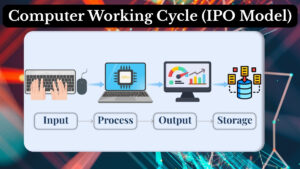
The working of a computer is based on a very simple and logical cycle:
Input → Process → Output → Storage
Consider this cycle as a mandatory process for computers whenever they perform any task. No matter whether the task is simple or complex. Whether you are typing a document, calculating marks, watching a video, or saving a file, the same order is used.
Initially, the computer waits for input from the user. Once the input is entered, the system starts working on that data. After the processing stage, the computer creates a result that can also be stored for future use if needed.
These concepts are the basic foundation that will help a beginner to realize that a computer is not magical. It just follows a simple fixed process again and again.
Instruction Based Working
As we learned earlier, a computer only works on instructions given by the user. It cannot perform tasks such as guessing the user’s preferences. It also cannot correct mistakes on its own and change its behavior unless the instructions are changed.
If the user enters the correct input, the output will also be correct. If the input is incorrect, the output will also be incorrect. The computer only works as instructed and cannot change its behavior on its own.
Now let us understand the working cycle of a computer.
Step 1- Input Stage
The input stage is the first phase in the computer working cycle. Every task starts here.
What Is Input?
Just consider input as any data or instruction that is given by the user to the computer. Input is like a raw material without which a computer cannot start any operation.
In simple words, input is what you tell the computer to do or what information you give it.
Simple Examples Of Input
Common examples of input include:
- Text typed using the keyboard
- Options clicked using the mouse
- Numbers entered for calculation
- Files or commands selected on the screen
When you type a sentence, those letters are sent to the computer as raw data. Till this point, the computer has not processed or produced any result. It has only received meaningless information from the user.
This stage is the initial point of all computer activities. No input means no action.
Step 2 – Processing Stage
The processing stage is the second phase of the computer cycle. After receiving input from the user, the computer moves to the processing stage. This is where the actual functioning is performed.
What Happens During Processing?
In the processing stage, the computer works on the input data according to the instructions given by the user. This work may include:
- Performing calculations
- Comparing values
- Arranging data in the correct order
- Applying simple logical rules
This entire process is done very quickly. It might seem instant to the user, but the computer still follows a proper sequence of steps internally.
Why Processing Is Important
Processing is necessary because it is used to convert raw data into meaningful information. The input would remain unorganized and useless without processing.
Observe this small example: if you enter the marks of students, those numbers alone do not contain any meaning, but when the computer calculates the total and percentage, the same meaningless data becomes useful information.
Processing gives meaning and purpose to the input provided by the user.
Step 3 – Output Stage
The next step after the processing stage is the output stage. Here the system provides the output.
What Is Output?
The final result presented by the computer after processing is known as output. It is the outcome of the instruction given by the user at the input stage.
Output is what the user can see, read, or hear.
Common Output Forms
It may appear in different forms such as:
- Text displayed on the screen
- Printed documents
- Sound from speakers
- Calculated results or messages
Consider this example for better clarity:
When you type a document, the text is shown on the screen as output. When you calculate numbers, the final result is displayed as output.
Output stage is just the visible working part of the computer that completes the process.
Step – 4 Storage Stage
Storage stage is the last phase of the computer working cycle, which is done after producing output. Here the computer can store the data or result for future use.
Why Storage Is Needed?
Storage is necessary because not every task is temporary. Users often want to save information for later use. Storage helps in:
- Saving of documents and files
- Keeping records safely
- Making data reusable in the future
- Avoiding repetition of work
For example, after typing a document, saving it allows you to open it again later. If you do not save the file, the work may be lost.
The storage stage ensures continuity and data safety.
Examples Computer Working from Real Life
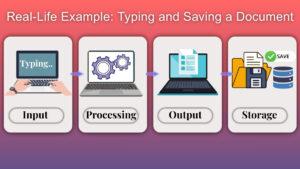
Let us observe the computer working process with a simple real-life example: typing and saving a document.
Step by Step Example
Step 1 – Input : Consider that you typed a text using the keyboard. The typed characters are sent to the computer as input or raw material.
Step 2 – Processing : Then, the computer processes that text by arranging letters into words and sentences according to instructions given by you.
Step 3 – Output : Next, the typed text appears clearly on your screen as output.
Step 4 – Storage : You save that document so that it can be opened, used, and edited later.
This simple example clarifies how the computer follows the same working cycle each and every time. Even the simplest task also involves all four stages.
The same process is applied when tasks like the calculation of marks, preparing reports, or browsing information online are done.
Why Understanding Computer Working Is Important?
It is very important for beginners to understand how a computer actually works. It will build confidence in the user and reduce confusion while using the system.
When you know these steps, you can recognize where a problem occurs. For instance you can check whether the error is with input, processing, output, or storage.
This knowledge will also create a strong foundation for learning more advanced computer topics. Almost all computer concepts are based on this basic working cycle.
It is also useful for exams, practical learning, and everyday computer use.
Common Mistakes Beginners Make
Many beginners make simple mistakes due to lack of understanding and knowledge. A very common mistake is thinking that a computer can perform critical thinking like a human but, in reality it only follows instructions and commands.
Another usual mistake is expecting the computer to understand incorrect input and give correct results, but as we discussed before, computer cannot correct user errors automatically.
Sometimes users forget to save their work, ignoring the storage stage. This can result in loss of data.
Understanding all of these four stages helps beginners to avoid these common problems.
Conclusion
A computer works in a clear and logical pattern. It does not perform tasks on its own. It also cannot make decisions independently. It strictly follows the instructions provided by the user.
The complete working cycle of the computer is as follows:
Input → Processing → Output → Storage
Firstly, data is entered into the system by the user. Then the computer processes that data. After completion of processing, the result is displayed to the user on the screen. Lastly, the information can be saved for future use in the storage stage.
This step-by-step working process forms the foundation of computer fundamentals. When these concepts are clearly understood by beginners, they are able to use computers more confidently, effectively, and logically in daily life.