
Hardware and Software: Meaning, Differences and Examples for Beginners
Introduction
While using computers in daily life, you might have often heard the words hardware and software. These two are very common but important terms in the world of computers. However, most of the new users feel confused about their actual meaning. Some of them think that hardware and software are the same thing, while others believe that they are separate systems and work independently of each other.
The actual fact behind them is very simple. Both hardware and software are basic parts of a computer system. Understanding these two concepts properly will help beginners to learn computers easily. You may face difficulty or confusion in learning advanced topics without understanding these basic concepts.
Our main aim is to explain hardware and software in a simple language through this article. We will not be using any complex definitions or technical details here. Our focus is only on clear understanding for beginners so that anyone can understand this difference easily.
What Is Hardware?
Physical or tangible parts of a computer are referred to as hardware. These are the parts that have real form, can be seen, or touched. In easy words, hardware is the body of a computer system.
While using a computer, everything that is used for physical interaction is hardware. These parts are used for every activity such as entering data, viewing results, or controlling the system. It forms the visible structure of the computer system.
Simple Meaning of Hardware
All the parts that are existing physically are included in hardware. If they are touchable, can be carried, plugged, or moved, it is hardware. These components are used to facilitate communication with the computer.
Check out this simple example, when you type something you are using a tangible device. When you look at the screen you are seeing output through a physical display. These physical tools allow the system to function in a practical way.
Hardware does not provide any instructions. It performs actions based on the instructions provided through software. Just like the whole computer system, hardware also cannot complete meaningful tasks without instructions.
Common Hardware Examples
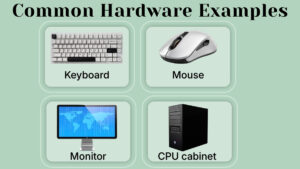
Some common examples of hardware are:
- Keyboard
- Mouse
- Monitor
- CPU cabinet
The keyboard allows the user to enter text, characters, and numbers. Selecting options and controlling movement on the screen is done using the mouse. The CPU cabinet stores the main physical components of a computer system.
Consider all these parts as a team that works together to create a usable computer setup. These are the main parts of a computer. Even if a single part is missing the user experience becomes limited. Hardware provides the structure to a computer which makes it usable.
What Is Software?
The set of instructions or program used to tell the computer what to do, is known as software. Unlike hardware, software does not have any physical form. You cannot see it or hold it directly in your hand like a device.
In simple words, software is the guide that controls the behavior of hardware. It tells the computer how to respond when you type, open, or click something.
Simple Meaning of Software
A collection of instructions that runs inside the computer system is software. These instructions helps in controlling tasks, and guiding the hardware on how to perform different functions.
However, software cannot be touched, but its results are visible. For example, when the user opens a document, plays a video, or searches for any information, software is always working in the background. It manages all the operations quietly and efficiently.
Software provides purpose to the hardware. Without instructions, hardware cannot know how to respond to any user actions.
Common Software Examples
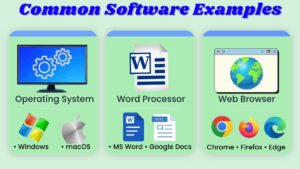
Some common examples of software include:
- Operating system
- Word processor
- Web browser
The operating system helps the computer in starting and functioning properly. A word processor is used to create and edit documents. A web browser helps the user in accessing online information.
These simple programs make a computer much more useful for daily tasks. Software is the reason that we can use a simple machine as a functional and productive tool.
Why Hardware and Software Need Each Other?
Both of them are designed to work together. None of them can operate properly without the other. Their relationship is completely based on cooperation and dependency.
Hardware Without Software
Imagine a computer that has a monitor, keyboard, and other physical parts, but no programs inside it. Even though it seems complete as a system, it cannot perform any useful or meaningful task.
The screen can turn on, but no meaningful action can be done. The keyboard will be present, but typing will not provide any result. In clear words, hardware without software is just a machine without any direction.
Software Without Hardware
Now let’s imagine the other way round.
Here programs are available but no physical device is there to run them on. Software cannot operate in empty space. It needs a complete physical system to perform functions.
Without hardware, software cannot respond, or display any output to the user actions. It simply has no platform to work on. This comprehension clearly proves that both hardware and software are dependent on each other for proper functioning.
Key Differences Between Hardware and Software
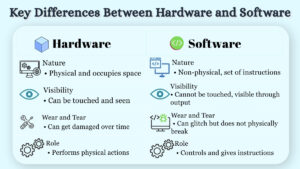
Nature
Hardware occupies space and has a visible structure. It is physical in nature.
While software, is non-physical. It just exists as a set of instructions and has no physical shape.
Visibility
Hardware can be touched and seen directly.
On the other hand, software cannot be touched. It functions internally and becomes visible only through its outcomes.
Wear and Tear
Due to physical usage, hardware can get damaged with time. It can stop working if it gets broken.
As we learned earlier, software is not used physically. Because of technical issues, it can glitch sometimes, but it does not break like tangible objects, unlike hardware.
Role
Hardware performs the physical actions of the computer, such as receiving input through the keyboard or mouse, and displaying output through the monitor.
Whereas, software guides to perform those actions by providing instructions and controlling its behavior.
Real Life Example to Understand Hardware and Software
Simple Example Explanation
Let us consider a simple example such as a mobile phone, that we use in our daily life. Its body, screen, and buttons are hardware because they are physical parts of the mobile phone. The applications installed inside it are software.
When we open a messaging app, the software gives instructions to the hardware to show text and accept input. Without those apps the phone could not perform any meaningful task, but without the phone device the apps cannot run.
This simple example clearly explains how hardware and software work together to create a complete system.
Common Mistakes Beginners Make
One very common mistake that beginners make, is to think that software is a physical device. Some also believe that if something appears on the screen, it might be hardware.
Another usual mistake is mixing the meaning of both terms and using them for different purposes. Sometimes we hear beginners say “the hardware is not opening”, but the actual issue is related to program, which is software.
Understanding that hardware is a physical device and software is a set of instructions helps remove such confusion. Computer learning becomes faster, easier, and more logical when the difference is clear to learners.
Why Understanding Hardware and Software Is Important?
Understanding the difference between hardware and software will help in building a strong foundation for computer fundamentals. It will also make daily use of computer more confident and less confusing for users.
When these basic concepts are cleared to users, they can identify simple problems much better than before. For instance, if your mouse stops working physically, the issue is likely hardware related. But if a document is not opening the issue might be related to software.
Many advanced topics are designed on this simple understanding. When the basic foundations is strong, advanced learning becomes smoother.
Conclusion
As we discussed above, a computer is a complete system with hardware and software. None of them is a whole alone. Hardware gives the physical structure to the system, while software provides the instructions which are used to guide the system.
Hardware makes it possible to interact with the machine, whereas software gives meaning and direction to those interactions. Neither of them can function properly without the other.
In simple terms, hardware and software together form a complete computer system. Learning the concept and differences of hardware and software will provide clarity to beginners. Also it will help them in gaining confidence and building a solid base in computer fundamentals.